How Accountants Can Simplify Client Management Workflows for Tax Season

Share the article
ShareFile for Your Firm
Secure document workflows your team and clients will actually use
Get StartedKey Takeaways
The busy season for accountants is nearly here. What are you doing to prepare for it? While you might be focused on client retention and acquisition, now would be a good time to get your workflow in order. Keep reading for tips on how to do that.
When you’re in the thick of tax season, you might be kicking yourself for not finding an easier, faster or more reliable way to work through the process with your clients.
Even if you haven’t done a close analysis of where you spend your time, you likely have a sneaking suspicion that you’re not as efficient as you could be when it comes to things like:
- Client onboarding
- File sharing
- Staying organized
- Client communication
- Team collaboration
- Closing the loop
- Being audit-ready
For many professional services firms, this is the reality. Client-facing staff spend an average of 20.3 hours every week on coordination tasks they can’t bill to clients, according to a recent survey reported about in The Hidden Cost of Client Engagement. These include tasks like hunting down missing documents, fixing incorrect submissions, tracking statuses and managing files and signatures.
In this post, we’re going to explore five ways to streamline your workflow now so you can work more efficiently during tax season.
Tips for Streamlining Accounting Client Management
The most common issue we hear is accountants getting bogged down in administrative tasks instead of doing the work that’s meaningful and profitable. While it all needs to get done, not all of it needs to be manually handled by you.
Here are some suggestions to help you reduce the time you spend on things like onboarding, document collection and client management. We’ll include some examples from Progress ShareFile software that demonstrate how to simplify each part of your process, too.
1. Consolidate into a Single System
Your client management process could have you bouncing around a dozen or so platforms to do things like:
- Find or follow up with a client.
- Send emails.
- Assign tasks.
- Generate contracts.
- Collaborate with team members.
- Share and organize files.
- Collect approvals and signatures.
While you’ll be hard-pressed to find a single app that does everything, the ShareFile platform is one that consolidates much of the administrative work of being an accountant.
For instance, this is the main dashboard:
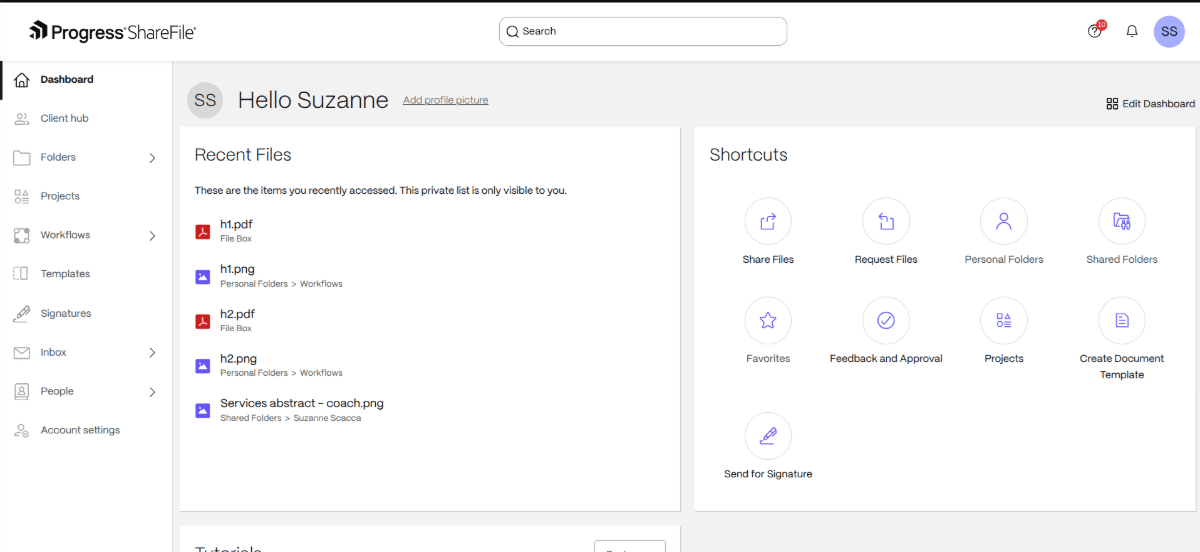
From the very start, things are clearly labeled and organized. In addition to finding handy shortcuts in the dashboard, the sidebar lays out everything you need, including:
- Client hub for managing clients and their info
- Tasks for assigning and managing to-dos
- Folders for uploading, collecting and organizing documents
- Projects for organizing client info, communications and files in one place more securely
- Workflows for running automations and gathering feedback
- Templates for queuing up pre-made, industry-specific folders, forms and request lists
- Signatures for collecting signatures
- Inbox for convenient communication with internal and external stakeholders
- People for managing your contacts
- Account settings where you can enable integrations
- Matters where you can auto-generate lists of documents or info to send to clients
As a cloud-based platform, ShareFile software can help reduce reliance on local hard drives, in personal spreadsheets or in private email chats. A unified system enables your accounting firm to operate as a collaborative and supportive team.
Clients will appreciate a consistent and intuitive user experience in addition to a system designed to help them more securely share information. Not only will it be easy to use, but they also won’t have to navigate a bunch of platforms to exchange data and communications with you.
2. Integrate with Other Client Management Apps
Think about how many apps you use on a daily basis. While it might not take a ton of time moving between them, you could cut way down on that time if only they’d speak directly with one another.
For example, if you were to incorporate ShareFile software into your workflow, it would allow you to connect with industry-specific tools like:
- Redtail Technology
- Orion Advisor Solutions
- Hubdoc
- CCH
- Drake
- Lacerte
- ProSeries
- UltraTax
And if there’s accounting software or a wealthtech app you can’t directly connect to, ShareFile software works with Zapier.
3. Templatize Your Process
If you don’t have a devoted project manager keeping tabs on everything, it’s all too easy for things to fall through the cracks. You could always write down a list of tasks and manage it yourself. But that takes time away from high-value tasks and client interactions.
So, what exactly can you automate?
To start, you can templatize your process at the project folder level.
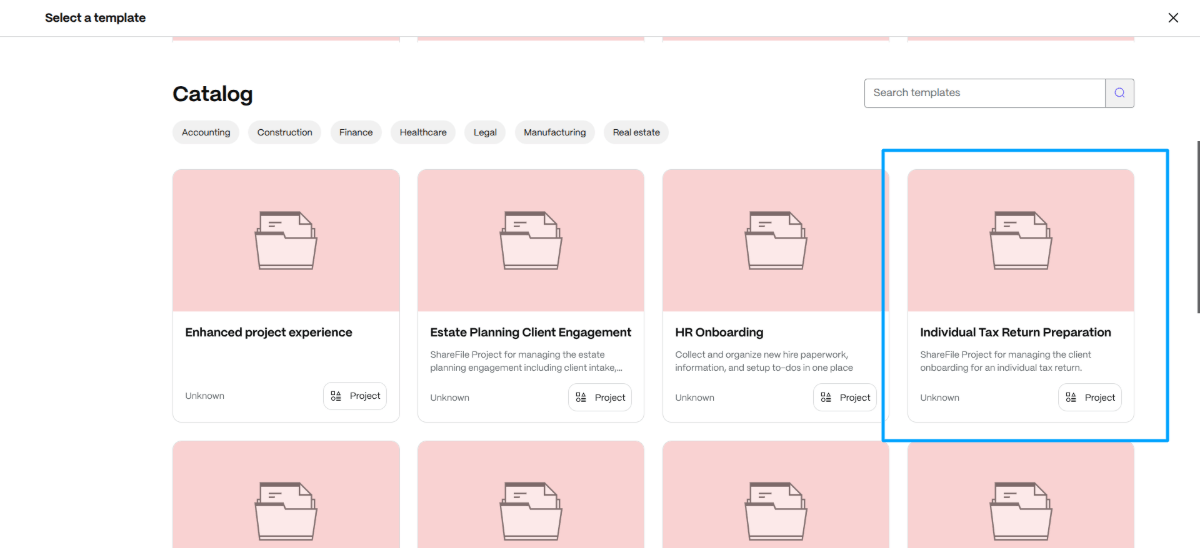
Instead of creating a client/project folder from scratch, leverage the ShareFile template catalog. In the screenshot above, you can see that there are custom-made templates for accountants, like the one for Individual Tax Return Preparation.
Once the folder is loaded, it will have relevant tasks and to-dos already included. Go through and remove any you don’t need and add in ones you do. Also consider adding files like a welcome letter, onboarding agreement and anything else you typically share with clients. Then save the folder as your own reusable template.
Another way to templatize your workflow is at the document level.
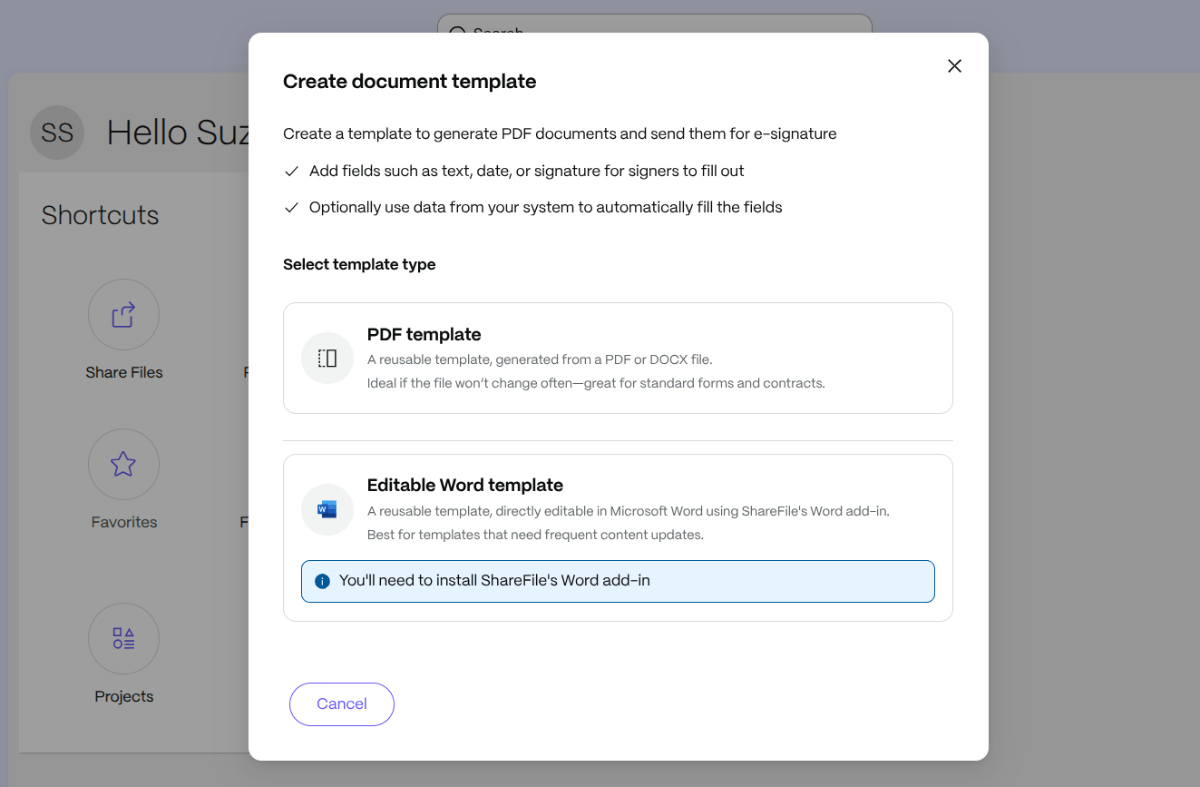
You have two options:
- Upload a PDF or DOCX. Then add fields that need to be filled in. This is a good option if the document is the same from client to client.
- Create an editable DOCX. This will allow you to customize your document before sharing it with clients.
Whichever you choose, you’re looking at time saved.
From an internal standpoint, it might take only a minute or so to chase down something like an engagement contract in your company’s shared Google Drive. (That’s if the file is properly named and isn’t stuck on one person’s local drive.)
But once it’s stored on the ShareFile platform and turned into a reusable template, it will be easy to retrieve and share with clients from now on.
There are other ways to leverage templates in the ShareFile platform. For example, if you go to the Templates Catalog, you’ll find a whole host of accounting-specific templates.
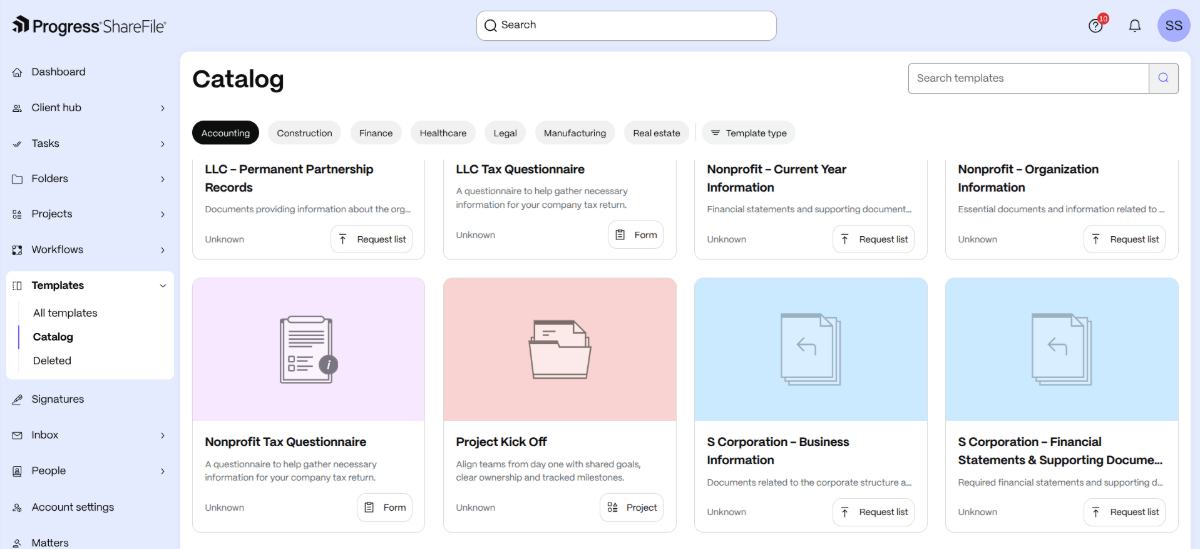
In here are templates for Projects, Request Lists and Forms. We’ve already covered the project templates, and we’ll see the request list templates in the next tip.
Now, form templates are useful if you need to gather other information outside of whatever files the client shares. For example, the ShareFile platform has questionnaires for:
- C Corporations
- Individuals
- LLCs
- Nonprofits
- S Corporations
As a bonus, forms hosted on the ShareFile platform allow for auto-filling. So, you can get your forms and questionnaires signed more quickly by prefilling them with info you (or they) already have. Clients can also use the auto-save feature to return to their forms when they’re ready to complete them.
4. Enable More Secure File Sharing
As an accountant, you have to ask clients for tons of supporting financial records and tax documents. It’s very likely that clients will miss some of the files you asked for, submit ones that are incomplete or contain incorrect information, or drag their feet on getting them to you.
ShareFile software can help in a number of ways.
To start, you can use the simple Request files tool:
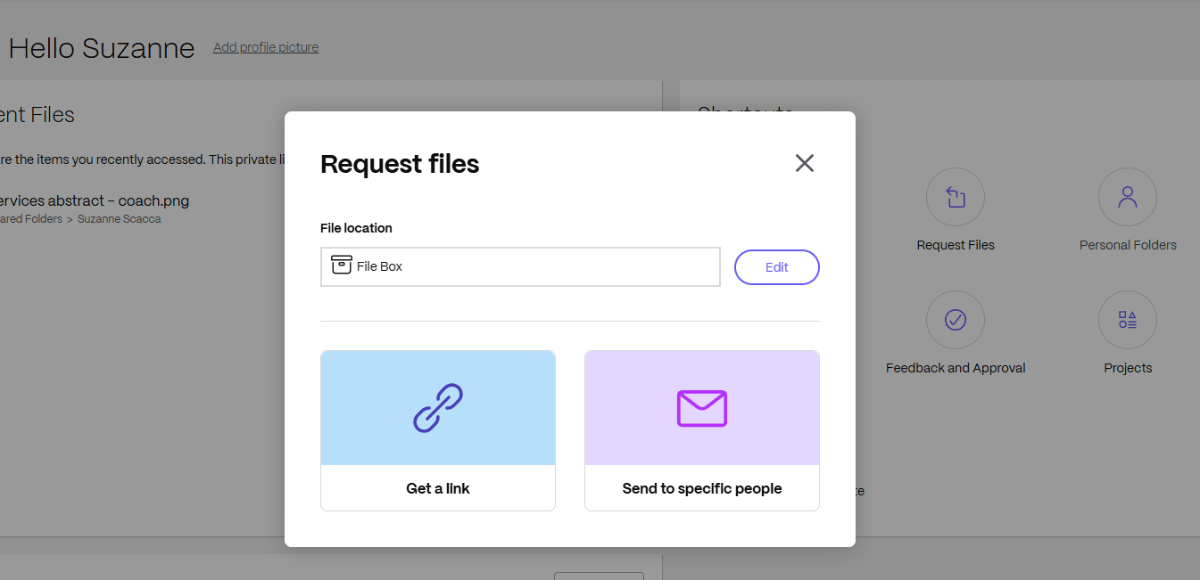
There’s nothing particularly complicated when it comes to this tool. All you do is select the file location and then send the link to the desired recipient. You can explain in the message what you’re looking for.
Another option is to use the Matters tool.
For instance, this is a General Intake matter:
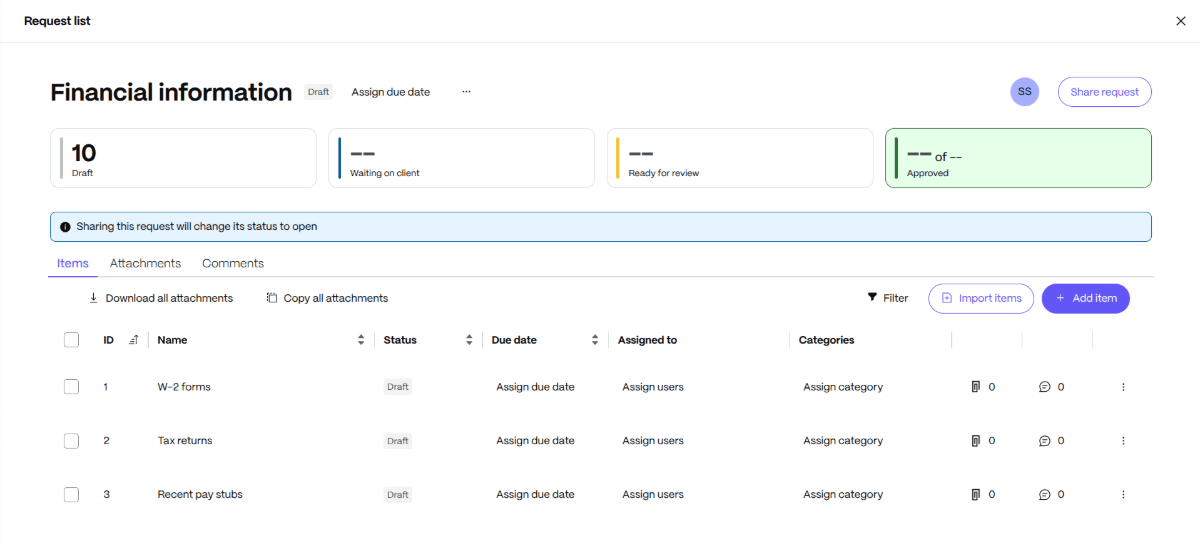
With an AI-powered request list like this one, you can collect client documents up to 3.5x faster.
Essentially what this does is put together a bulk file request. This particular template comes with pre-loaded requests for:
- W-2 forms
- Tax returns
- Recent pay stubs
- Bank statements
- Investment accounts
- Debt information
- Business records
- Cryptocurrency accounts or assets
- Other financial information
- Additional sources of income
You can modify the requests to include only the files you need. You can also use AI to help you generate ones that may be missing.
When the list is set, change the status on each item, assign the task to a user and apply a due date. This will trigger the system to notify you and the user (i.e., your client) when things are late.
5. Collect Electronic Signatures
While you do most of the legwork, your clients need to be active participants in the preparation of their taxes. In some cases, this can leave you feeling like a babysitter, trying to chase them down for answers to questions, missing files and signatures.
As you’re nearing the end of a job, the last thing you want is for things to get held up—either because a file is missing info or because you can’t get the client to sign. The same goes for the start of the job when you send out the initial contract.
ShareFile software can support you in this.
The first tool is called Feedback and Approval and you’ll find it under Workflows.

This is useful for sending prepared tax returns for review. Clients can view and mark up the files with any changes or questions in environment designed to support more secure collaboration.
The second tool is called Signatures. Use this to send out anything that requires a signature, including the initial client contract, non-disclosure agreement, onboarding agreement as well as the final tax return.
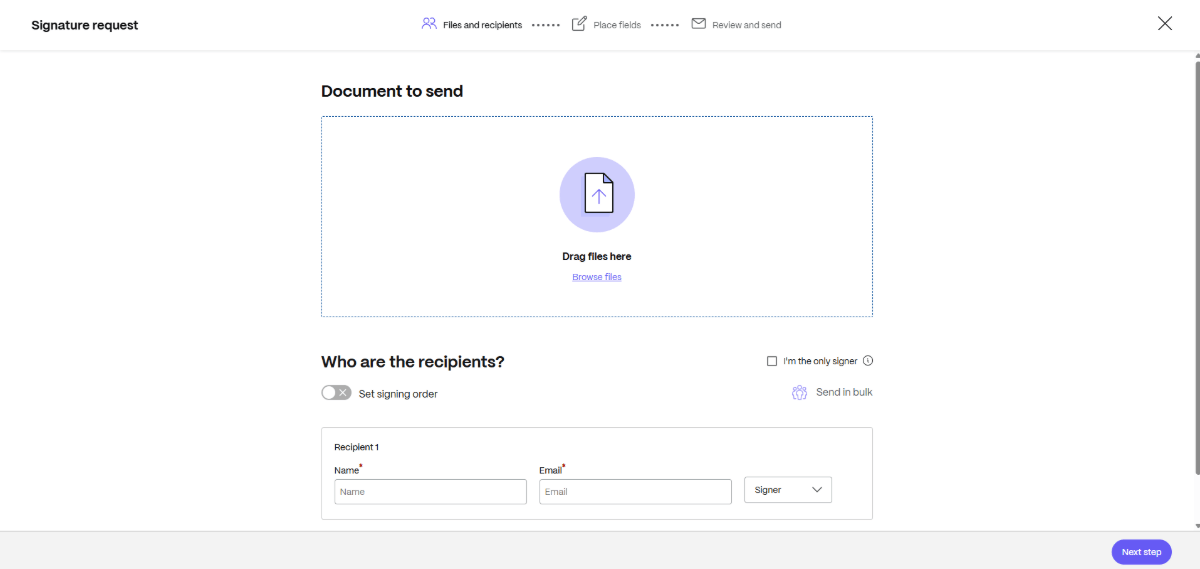
There’s no need to shuttle clients over to third-party software to sign anything either. It’s all done from the same platform they’ve been using from the beginning.
It’s also worth noting that ShareFile software supports electronic signatures for IRS Form 8879 when applicable requirements are met. This can allow the signature process to be completed online using knowledge-based authentication rather than requiring clients to print, scan and return the document.
Wrapping Up
With a consolidated administrative system, a templatized workflow, AI-powered automations and other time-saving features, you may be able to:
- Cut up to 4.25 hours off each client’s tax return prep.*
- Reduce redundancies, mistakes and errors.
- Collaborate easily with team members.
- Impress clients with a well-organized management system.
- Enhance the security of your clients’ data.
- Turn tax filings, audits and other financial work around faster.
There are some aspects of an accountant’s job that can’t be automated or streamlined with technology. That said, there are a lot of client management tasks you can offload to ShareFile software for accountants. And, especially during tax season, that’s a huge deal.
*This calculation is an estimate only based on internal research using current prices and is subject to change. Progress is not responsible for the content, results, or accuracy of the estimate information and actual results will vary.
The information provided on this blog does not, and is not intended to, constitute tax advice. Any reader who needs tax advice should contact their counsel to obtain advice with respect to any particular legal matter. No reader, user or browser of this content should act or refrain from acting on the basis of information herein without first seeking legal advice from counsel in their relevant jurisdiction.
Topics
-
Client Engagement
-
VDR
-
File Management
-
File Sharing
-
Integrated E-signature
-
Apps and Integrations
-
Workflow Automation
-
Security and Compliance
Subscribe to ShareFeed Today
Stay ahead with the latest ShareFile releases, feature enhancements, and product updates delivered monthly straight to your inbox.

A former project manager and web design agency manager, Suzanne Scacca now writes about the changing landscape of design, development and software.
Related Posts