AI-Assisted Document Workflows: Where AI Helps, Where Humans Decide, How Security Fits In

Share the article
ShareFile for Your Firm
Secure document workflows your team and clients will actually use
Get StartedKey Takeaways
AI assists with document workflow activities, but human oversight drives key decisions and outcome ownership.
How much of a document workflow should you actually hand over to AI?
From summarizing documents and identifying missing information to organizing files and supporting decisions, there are plenty of opportunities to put AI to work. The challenge is deciding where that assistance saves time and where people still need to verify information, handle exceptions or make the final call.
An AI-assisted document workflow uses AI to support specific tasks as documents move through a process, while people remain accountable for decisions and outcomes that require human judgment.
AI-Assisted vs. Rules-Based Automation vs. Agentic Workflows
AI-assisted workflows, traditional automation and agentic workflows can all reduce manual work, but they do it in different ways.
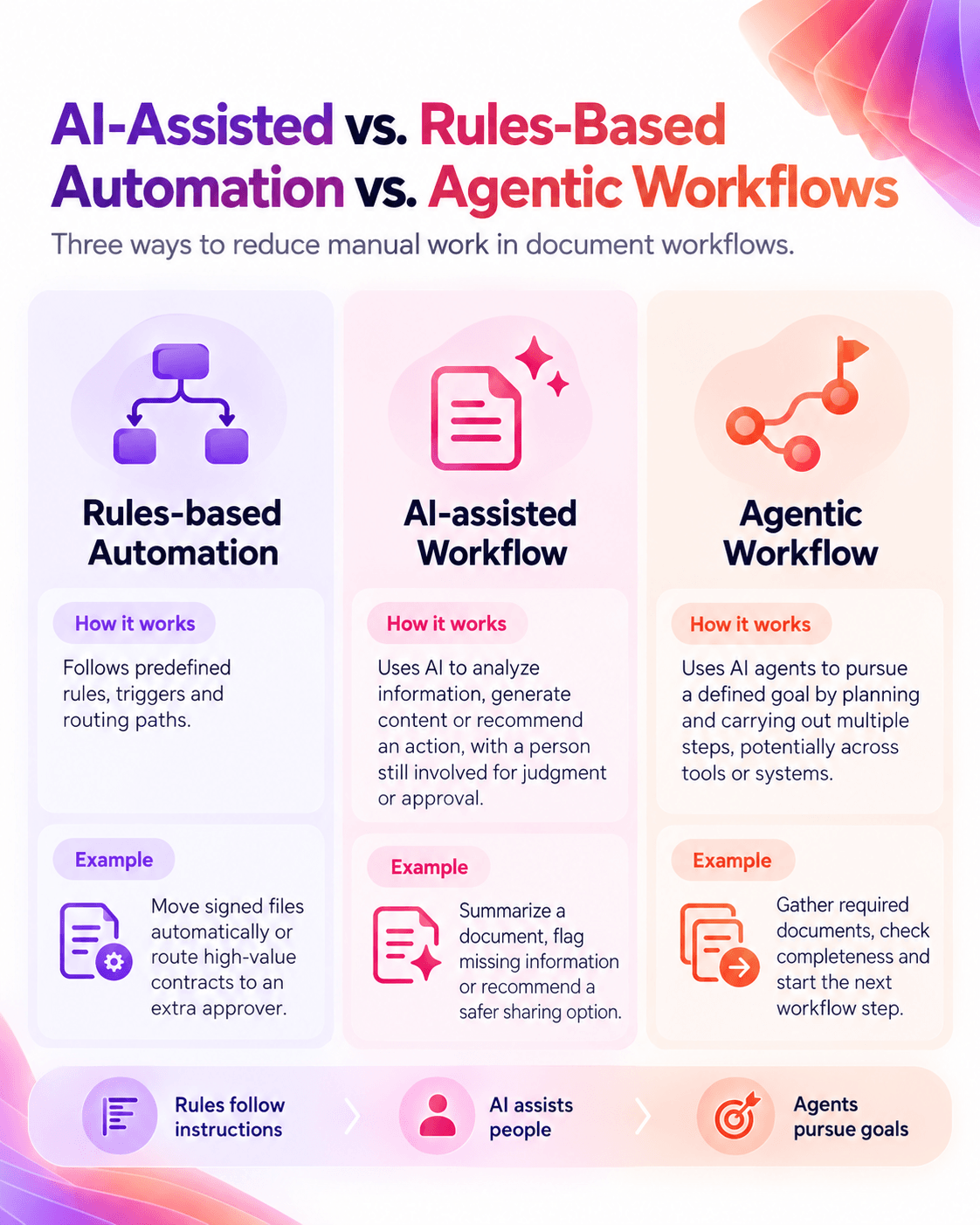
These approaches can work together. Rules can route documents, AI can analyze their contents and people can handle exceptions and decisions. As AI takes on more of the workflow, clear permissions, boundaries and human oversight become increasingly important.
Where AI Helps Across the Document Workflow
The right balance between AI and human involvement isn’t the same at every stage of a document workflow. Here’s where AI can take on more of the work and where people still need to stay in control.
AI vs. Human Responsibility Across the Document Workflow
| Workflow Stage | Where AI Can Help | Where People Remain Responsible |
|---|---|---|
| Request | Generate document requests or help identify what information is needed. | Confirm what is required and handle unusual or sensitive requests. |
| Submission | Check submissions for missing information or potential issues. | Resolve exceptions and confirm whether the submission is acceptable. |
| Organization | Suggest file names, categories or other ways to organize documents consistently. | Confirm classifications where context or business requirements matter. |
| Review | Summarize documents, answer questions about their contents and surface information for review. | Verify important information, interpret context and determine what action to take. |
| Sharing | Help users identify more secure or appropriate ways to share documents based on the situation. | Decide who should receive access and whether the proposed access is appropriate. |
| Approval | Help surface relevant information or identify issues before an approval decision. | Make the approval decision and remain accountable for it. |
| Governance | Help identify inconsistencies, missing information or other potential concerns. | Define policies, permissions and controls and determine how exceptions should be handled. |
The balance changes according to the risk of the task. AI can take a larger supporting role in repetitive, low-risk work, while financial, legal, compliance or other consequential decisions may require more verification and human involvement.
High-Value Uses of AI in Document Workflows
AI can help reduce repetitive work across several stages of a document workflow, particularly where teams are spending time preparing requests, checking submissions, reviewing information or managing files.
Some of the strongest opportunities are in the repetitive tasks that surround document collection, review, organization and sharing.
Generate Document Requests: Build requests around the information or documents needed, giving teams a starting point they can review and adjust rather than creating each one manually.
Summarize Documents and Answer Questions: Get to the important details in lengthy files faster with summaries and answers to specific questions about their contents.
Validate Submitted Information: Check documents for missing or inconsistent information before they progress, giving teams an opportunity to resolve issues earlier in the workflow.
Keep Files Organized: Suggest file names based on document content to reduce manual renaming and make consistent naming easier to maintain.
Support Safer Document Sharing: Recommend more secure sharing options based on the situation, helping users choose an appropriate way to share sensitive information.
AI Accuracy and Exception Handling
AI output may be incomplete or incorrect. Teams should define what happens when AI produces conflicting information, encounters an exception or can’t complete a task, such as routing the document for human review or requesting more information.
Verification should reflect the risk. A file name suggestion may need only a quick check, while information informing a legal, financial or compliance decision may need verification against the source.
Human Oversight and Accountability
Human oversight is particularly important for:
- Approval or authorization: An appropriate person remains responsible for deciding whether a document can proceed.
- Legal, financial or compliance decisions: AI can surface information, but qualified people should interpret it and make consequential decisions.
- Exceptions: Unusual circumstances or conflicting information should have a clear path to human review.
Oversight doesn’t mean manually repeating every task. It means defining what can be handled automatically, what requires verification and which decisions still need human approval.
Permissions, Security and Governance
These workflows should operate within the same security and governance controls that help strengthen document protection elsewhere in the process. New capabilities shouldn’t give users or systems broader access to sensitive information.
Teams should consider:
- Data access: What documents and information can the AI access?
- Permissions: Does it operate within existing user and workflow permissions?
- Data handling: What controls support the processing, storage and protection of information?
- Governance: Which AI uses are permitted, restricted or require review?
- Auditability: Can teams determine what happened and who took the relevant action?
- Compliance: Does the workflow support the organization’s efforts to meet applicable regulatory, contractual and internal requirements?
AI should fit within the organization’s wider approach to document security, permissions, retention and accountability, with additional controls where it introduces new risks.
AI-Assisted Document Workflow Examples
Legal Document Workflow
A legal team<![if !supportAnnotations]>[DD1]<![endif]> could use AI to generate document requests, organize incoming files and summarize lengthy documents. Missing information or issues requiring legal interpretation can be routed for review, with lawyers remaining responsible for legal analysis and approval.
Finance Document Workflow
For finance teams, missing or inconsistent information in supporting documents could be identified before the workflow progresses. Rules-based automation can then route documents based on factors such as department, value or document type, while the designated approver handles authorization and exceptions.
Accounting Document Workflow
Accounting teams could use AI-assisted tools to organize client documents, suggest file names, flag incomplete submissions and find information through summaries and Q&A. Information affecting accounting treatments, filings or other consequential decisions should still be verified by the appropriate professional.
How to Evaluate AI for Document Workflows
Not every document task needs AI. Start with the friction in the existing process, then consider whether these capabilities could genuinely improve it without adding unnecessary risk or complexity.
For each use case, ask:
- What problem is AI solving? Identify the manual work or delay you want to reduce.
- How important is accuracy? Consider the consequences of an incomplete or incorrect result.
- Where does human review belong? Define what requires verification, approval or escalation.
- What information can AI access? Check whether access and data handling align with existing permissions and policies.
- Does it fit the workflow? Consider how it works across collection, review, approval, sharing, e-signature and retention.
- Can you measure the benefit? Look for improvements such as faster review, fewer incomplete submissions or less manual work.
A simple framework is value, risk and control: What does AI improve? What happens if it gets something wrong? What controls keep people accountable?
Start where the value is clear and the consequences are manageable, then expand based on what works.
AI-Assisted Document Workflow FAQs
What Is an AI-powered Document Workflow?
An AI-powered document workflow uses AI to support tasks such as generating requests, summarizing documents, validating information and organizing files while maintaining human oversight where needed.
What Is the Difference Between AI and Automation in a Document Workflow?
Rules-based automation follows predefined instructions. AI can analyze content, generate information or recommend actions based on context. Both can work together in the same workflow.
How Accurate Is AI When Reviewing Documents?
Accuracy varies by technology, task and document. Important AI-generated information should be verified against the source when errors could affect the outcome.
How Can Organizations Support More Secure Use of AI in Document Workflows?
Organizations should configure AI to operate within appropriate permissions and controls that help them address requirements for document access, processing, sharing and handling.
Can AI-assisted Document Workflows Support Compliance?
AI can help organizations with compliance-related processes, but its use alone doesn’t make a workflow compliant. Organizations remain responsible for meeting their regulatory, contractual and internal requirements.
Build AI Into the Workflow Without Losing Control
The real value comes from putting these capabilities to work at the right points in the process—reducing repetitive tasks, helping people get to information faster and surfacing issues earlier.
Automation can keep predictable steps moving, while people remain responsible for decisions, exceptions and anything that requires judgment or approval.
That balance can help teams shorten document workflows while supporting appropriate control over sensitive information and important decisions.
Find out where Progress ShareFile AI-driven workflows can take work out of your document workflows.
Explore more with ShareFile workflow automation.
Topics
-
Client Engagement
-
VDR
-
File Management
-
File Sharing
-
Integrated E-signature
-
Apps and Integrations
-
Workflow Automation
-
Security and Compliance
Subscribe to ShareFeed Today
Stay ahead with the latest ShareFile releases, feature enhancements, and product updates delivered monthly straight to your inbox.

Katie Austin is a media strategist and audience engagement expert with a passion for data-driven storytelling. As the Strategic Awareness & Advocacy Lead for Progress Sitefinity, she brings years of experience in audience development, media analytics and social strategy from top mainstream media organizations.
Related Posts