Creating an Effective Client Feedback Process for Your Agency

Share the article
ShareFile for Your Firm
Secure document workflows your team and clients will actually use
Get StartedKey Takeaways
Getting client feedback throughout a design and development job might sound like a headache waiting to happen. The trick is to create a repeatable process with a system that empowers your client to do their part. Let’s look at what steps and tools to streamline the process.
As you build websites and apps, there are certain milestones you hit along the way. Some of these design and development stages you can hash out internally with your team. But others, you may need to get your clients to weigh in on.
Client feedback can be super beneficial in web design. The key to extracting all the benefits from it and avoiding the more common drawbacks is to have an iron-clad system and process in place.
In this post, we’ll look at what that process might look like and why each step is integral to the overall success of your project.
How to Create an Effective Client Feedback Process
The end goal in collaborating with clients is to get helpful and detailed feedback from them. Along the way, you’ll likely have other goals, too. For instance:
- Get consolidated input from one team member and decisionmaker
- Receive feedback in a timely fashion
- Collect the feedback using a system that makes sense for the client and for you
- Limit the number of rounds of feedback and revisions
- Leave clients feeling empowered and satisfied with the end results
To help you get these desired outcomes, here are some tips for creating a client feedback process that supports everyone involved:
1. Ask for Feedback Throughout the Process
It might seem like overkill to ask your client for feedback various times over the course of your project. And it very well could be depending on the scope of the job.
For smaller products or even MVPs, you might only need to engage with them a couple times (i.e., after the initial designs are mocked up and to get their input on the final prototype). However, for larger and more complex digital products, it would be beneficial to get their input several times.
For example, here are some stepping stones that might be worth reviewing with them:
- Market/competitive research done
- User research and testing results are in
- User personas created
- Style guide or design system developed
- Home page/screen mocked up
- Splash screen designed
- Onboarding sequence developed
- User flows mapped
- Custom components designed
- Checkout flow built
- Workable prototype developed
For some of the earlier stages, client input could be really valuable, especially as it relates to their business as well as their understanding of their industry. Ultimately, though, you are the expert when it comes to design and development. So, you’ll have to decide how much feedback your client needs to give as you progress past the initial research and setup phases.
One option is to batch several of these milestones together and present them all at once—like the Splash Screen + Onboarding Flow + Home Screen for a mobile app. That way, you’re not giving them an opportunity to nitpick over individual segments. Instead, they’re reviewing them as one cohesive flow.
This is a good option for a more basic digital experience.
That said, let’s say you’re designing something to rival the likes of Reddit or Bumble. With so much functionality baked into a single product, it’s going to take a while for you to flesh out the entire experience. In that case, it might be beneficial to have a standing meeting with your client every week to review progress.
This would be less about gathering weekly feedback and more about checking in with the client to make sure your team is still on the right track.
Regardless of how much client interaction a particular job calls for, you need to set the expectations early—like even as early as the signing of the contract. The client should understand:
- The role they have to play in the design/development of their product
- When or how frequently you’ll call on them to provide feedback
- What your expectations are for feedback (e.g., direct, helpful, specific)
- What happens if they don’t provide feedback
- What the process is to collect feedback and get approvals so you can move forward
Note: If you have a client who doesn’t want anything to do with the nuts and bolts of the project and who fully trusts you, then you don’t need to loop them as much in throughout the job. That said, you should only skip your standard client feedback steps if you know the client can commit to this. The last thing you want is to deliver the final product, only for them to want to undo everything you’ve done.
2. Introduce and Review the Work Together
It might seem easier to send a bunch of files and notes to the client whenever you need their feedback. One less meeting for you means more time to work on other things.
The problem is that certain assumptions have to be true in order for this to work:
- Your client is tech-savvy enough to be able to open and comment on the files.
- They are capable of explaining to you what needs to be changed and why (instead of just “I don’t like it”).
- They either understand why you did what you did or they implicitly trust your decisionmaking.
- They don’t feel the need to question every bit of your work simply because you’ve asked for their feedback.
- They’re able to keep the review process controlled and not bring in various disjointed opinions.
In my personal experience, it’s too much of a gamble to trust that your client can own this part of the process by themselves.
The best way to handle it instead is to introduce your work to them in real time before inviting them to share their feedback. In order for this to be an effective discussion, you need to feel confident enough to take the reins.
Here’s what I would suggest:
Schedule a Live Meeting
If you schedule a phone call with the client, you risk them getting distracted by text messages or social media or whatever else they are looking at instead of you and the work you’ve done. Always schedule the meeting over a video conferencing platform. I prefer Zoom, but other conferencing platforms like Google Meet will do.
Create an Agenda
Know which milestone you’re there to discuss. This way, if your client starts talking about Service page designs they love or how they really need their Google Business listing to appear in Maps results, you can steer them back to the task at hand.
Limit Who Can Attend
If there’s one person from your team presenting the work, they really only need one representative/decisionmaker from their end to show up. Maybe two. Any more than that, and your meeting is likely to go off the rails as people present conflicting opinions and competing agendas.
Explain What You’ve Done
You don’t need to go into the tools or techniques you used. But you should explain what you’re presenting, address anything they had specifically asked for, mention any potential or real obstacles you encountered or anticipate, etc. Take charge of this initial part of the meeting and be confident in what you’re explaining.
Bring Any Data You Have
Before you discuss the milestone with the client, mention any data that informed what you worked on. For example, you might explain how the user research you did led to certain decisions that deviate from what they were expecting.
Also, share the results you gathered with them. Not only will this give them a better understanding of why you did what you did, it might help them make better decisions in other parts of their business.
Open Up the Floor
Once you’ve finished explaining the what and why, open up the conversation. Your client probably won’t have a ton of feedback, if any at all, and that’s to be expected. But it would be nice to get their first impressions and reactions in real time. Make sure your work is visible on the screen as they give their thoughts.
Prep Them for Next Steps
Let them know you’re going to give them time outside the call to review and submit feedback. Explain what exactly you want feedback on. For instance, if you’re focused on purely aesthetics, you can ask them to ignore the navigation and placeholder text in the app designs.
Also, explain how they’re going to submit their feedback. You can do a quick walk-through of the solution.
Lastly, give them a deadline. If this was outlined in the initial scope of work or contract, remind them of the terms they agreed to.
3. Share the Files in a User-friendly Feedback Tool
Whenever possible, I try to find all-in-one solutions that cut down on how many tools I have to use throughout the design lifecycle. For administrative management of client projects, that tool is Progress ShareFile.
I like that it enables me to:
- Manage clients
- Create projects
- Add and assign to-dos
- Store all communications and files related to a project in one place
- Share files with the client for feedback and approval
Let’s focus specifically on the feedback step.
Now, I’ve used other visual feedback tools before. They can be really helpful at this stage, but only if they’re user-friendly (and some of them are just too complex or clunky). Ultimately, the goal is to send the feedback request link to the client and empower them to use the tool without instruction.
That’s why I think ShareFile is a good solution. To locate the feedback tool, go to Workflows > Feedback and Approval.
This obviously isn’t my design. This is a screenshot I used in another article I wrote. But let’s say this is a design I came up with for the hero section of my site.

I really like having a structured and clutter-free space like this for clients to leave feedback. If you can remove other distractions, it’ll be much easier for them to focus on the task at hand.
Also, there are no cumbersome toolbars. The client doesn’t have to add shapes or use text highlighters or place selectors on specific components. All they do is click their cursor on the part of the file they’re referring to, type in a comment and hit Save.
This makes it super easy for them to ask questions and leave feedback in a visual interface without overcomplicating things.
You can then go in and reply directly to their comments and ask for clarifying questions. You can also leave your own comments within the file if you want to illustrate certain points before they review it or afterwards to point out something they may have missed or misunderstood.
This will be a much more efficient way to discuss feedback than to do so out of context (like pasting screenshots of the areas in question into an email).
4. Control Who Can Comment
Another feature that’s going to be helpful in ShareFile is participant feedback control.
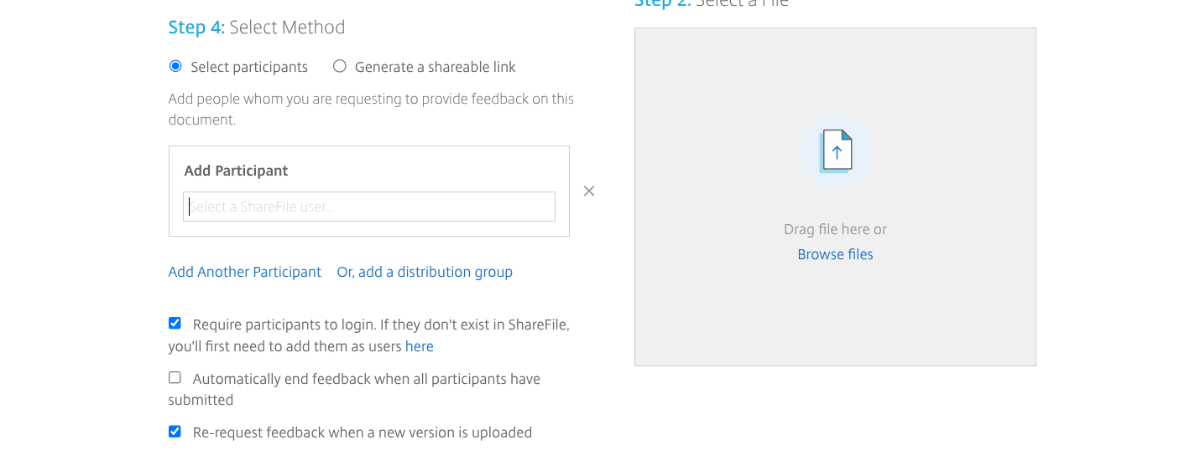
When you upload your file, there’s an area where you can select participants. If you want to keep client feedback under control, use this tool to give access only to those stakeholders whose opinions and decisions matter.
This will enforce your policy when it comes to feedback consolidation. Because if only one or two people can access the file, they’re either going to have to be the sole decisionmakers or they’ll have to collaborate internally and consolidate their feedback before submitting it.
Too many times, revision rounds get out of control because the client wants someone from marketing and then from sales and then their mother’s best friend’s son to look at your work. But if your contract dictates that only a certain number of revision rounds are allowed and you have a tool that limits who can leave feedback, this will force your clients to reconsider that approach.
5. Assign To-dos to Your Client
Using the same feedback management system (if possible), assign to-dos to your client. Even if you sent them an email describing what you’re looking for, it’s not a bad idea to elaborate within the to-do about what needs to be done.
For example, in ShareFile, you can create To-dos in your client’s project folder and add lengthy descriptions to them. In this one, I provide instructions for leaving feedback in the file.
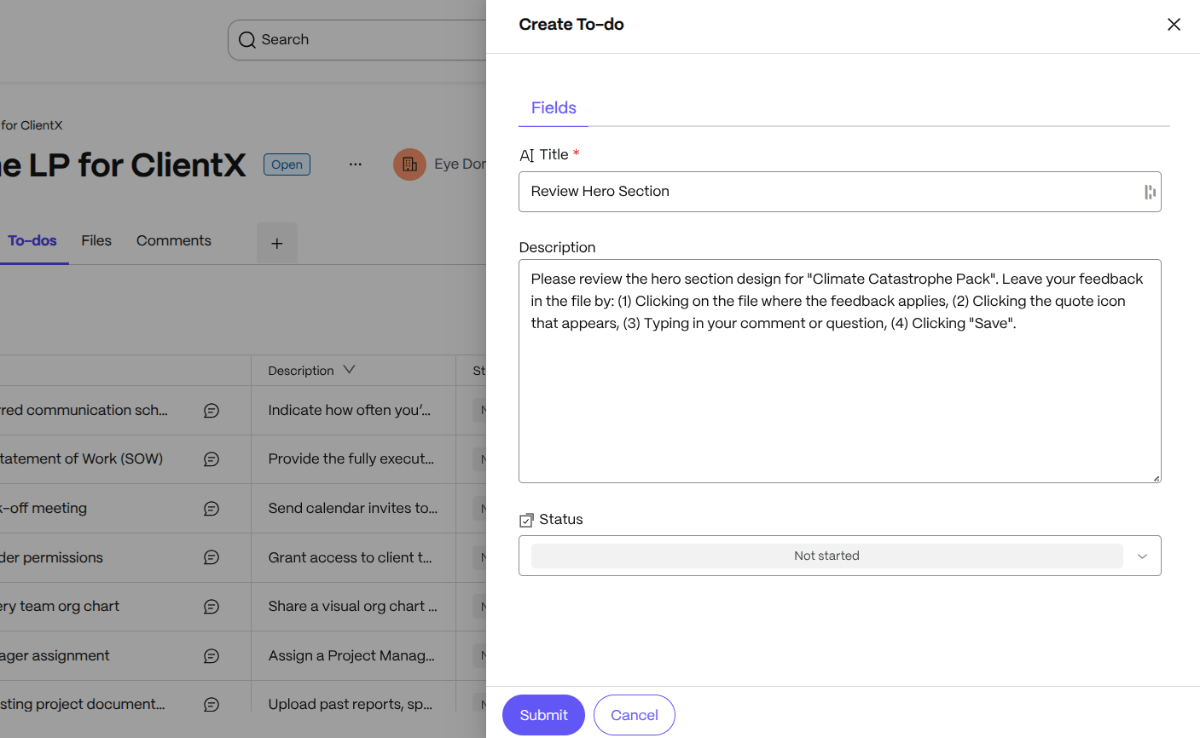
What’s also nice about this feature is you can:
- Update the status of the to-do (from Not Started to Completed)
- Add a due date (which will trigger reminders)
- Assign a user (internal or client)
- Add attachments
You and your client can also leave comments on the to-do. So if you want to check on the status of the to-do or they have any questions, you have a system that keeps all those communications in one place. And it also attaches those communications to the relevant tasks.
6. Track Your Client’s Progress
In terms of keeping tabs on your client’s progress, ShareFile will help—but only when the client uses the system. So, when they submit all their feedback, change the status of the to-do or leave a comment in the folder, you’ll receive a notification about it.
But let’s say you don’t hear anything. What’s the plan?
If you have a signed contract and agreement with the client, refer to the feedback clause (if there is one). It should stipulate how many rounds of feedback are included in each phase, how long the client has to respond and what happens if they miss the deadline.
If you don’t have such a clause, consider adding one so you cut down on these types of delays in the future.
For now, what you need to do is enforce the terms of your contract or the feedback process your client agreed to at the start of the job. For example, it might look like this:
- Client has 5 business days to review file and submit feedback.
- Client may request up to 3 rounds of reviews.
- If feedback or approval deadline is missed, follow up with them within 24 hours.
- If no response by 72 hours, follow up again to check in and remind them about policy.
- If no word 24 hours later, send an email letting them know the project is on hold.
- Reiterate the process for starting the project back up (like a restart fee) and give them a new date when work will resume.
Waiting around for a client to provide feedback can really mess up the rest of your production schedule. That’s not fair to your team nor is it fair to your other clients. This is why it’s necessary to keep close tabs on your client when something is sitting with them for review and then to initiate the late feedback process. This should help prevent this sort of thing from happening in the future.
For clients who do provide feedback on time, the goal is to get them to officially approve the milestone. You can use the same Workflow tool in ShareFile for this. Go to Workflows and Feedback and Approval. When you click Initiate New, choose Get Approval. The setup and interface are similar to the feedback one. Only this time, all the client has to do is submit their approval.
Once you’ve collected the approvals of all stakeholders, you can get back to work on the next phase of your job.
Wrapping Up
I’ve known web designers and developers who avoid asking for client feedback because they think it’s too much of a headache. They assume that clients won’t give helpful feedback, will drag their feet on leaving any feedback at all, or will force them to do a ton of unnecessary work.
With a process in place, though, you can remove a lot of obstacles from the client feedback process. If your clients feel empowered—like their input is valuable and you’ve made it easy to share it with you—this process can go smoothly. It can also help you avoid the scope creep that often comes with clients who are allowed to run wild.
So, if you haven’t done so already, come up with a process that works for both you and your clients, find a tool that will help you get organized and formalize the process in your contract.
Explore the free trials available for the ShareFile platform to see if it could be the one for you.
Topics
-
Client Engagement
-
VDR
-
File Management
-
File Sharing
-
Integrated E-signature
-
Apps and Integrations
-
Workflow Automation
-
Security and Compliance
Subscribe to ShareFeed Today
Stay ahead with the latest ShareFile releases, feature enhancements, and product updates delivered monthly straight to your inbox.

A former project manager and web design agency manager, Suzanne Scacca now writes about the changing landscape of design, development and software.
Related Posts