Why Professional Services Firms Are Ditching Legacy EFSS Tools

Share the article
ShareFile for Your Firm
Secure document workflows your team and clients will actually use
Get StartedKey Takeaways
Professional services firms have strict standards when it comes to file and data management. Take a closer look at what makes base-level EFSS solutions different from purpose-built ones like Progress ShareFile.EFSS stands for enterprise file synchronization and sharing. As opposed to sharing files over platforms like Gmail or Slack, this kind of software gives professional services firms the ability to help securely share, store and manage files in the cloud.
Like so much software these days, your firm has a plethora of options to choose from when it comes to EFSS. Box, Dropbox and Google Drive are some of the most popular file-sharing apps.
But are legacy EFSS tools like these suitable for your organization?
In this post, we’ll look at the limitations and problems that arise when using generic EFSS tools, and the reasons why professional services firms are leaning into more purpose-built solutions.
What’s the Problem with Legacy EFSS Tools?
There’s nothing inherently wrong with using legacy EFSS tools. For some businesses, a generic solution that allows for the quick and convenient sharing and storage of files is good enough.
That said, tools like Box and Dropbox are pretty basic. They do two things really well:
- File sharing
- File syncing
Some of these tools (like Google Drive) come with document generation capabilities as well.
These types of legacy EFSS tools can make file sharing and organization simpler, especially for distributed teams and clients. However, they’re lacking critical functionality that forward-thinking professional services firms are looking for.
Why Professional Services Firms Prefer Modern EFSS Tools
According to Markets and Markets, the global EFSS market is expected to grow to $35.5 billion by 2028 (up from $9.4 billion in 2023). There are a number of drivers of this growth, especially in document-centric industries like professional services.
For starters, an increase in distributed teams as well as remote and hybrid workers has firms looking for more effective collaborative solutions. Other drivers in the professional services arena include a need for greater security, productivity and scalability.
Let’s have a look at four things that make purpose-built solutions like Progress ShareFile more useful than general-purpose EFSS:
1. More Than Just File Sharing and Sync
Let’s take a quick look at Dropbox:
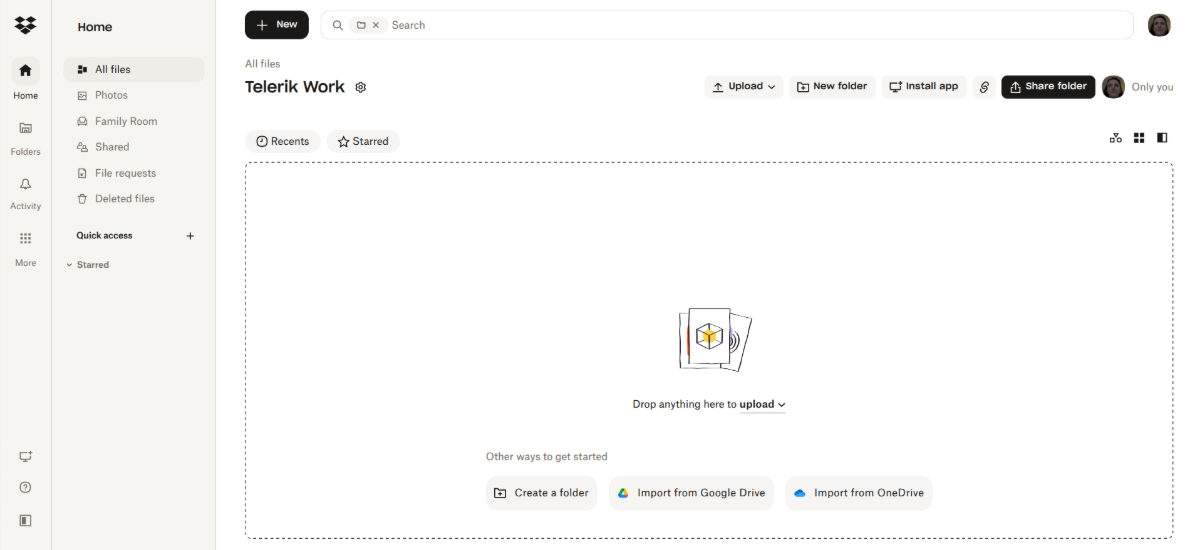
Realistically, what could a firm like yours do with a general-purpose EFSS like this one?
The cloud-based system allows for real-time file transfers, which is a must. You also have the ability to organize your files into folders. In addition, there are some automations available, though they mostly involve converting files to other formats or auto-sorting them into folders.
But let’s say you’re the IT Director at a consultancy. The president wants everything centralized as much as possible. General-purpose EFSS will only get you so far before you start looking for other software to fill in the gaps in your workflow.
Take ShareFile software, for example. The platform may initially appear as minimalistic as Dropbox. However, when you dig deeper, you’ll see that it comes with a comprehensive collection of features tailor-made for document-centric firms.
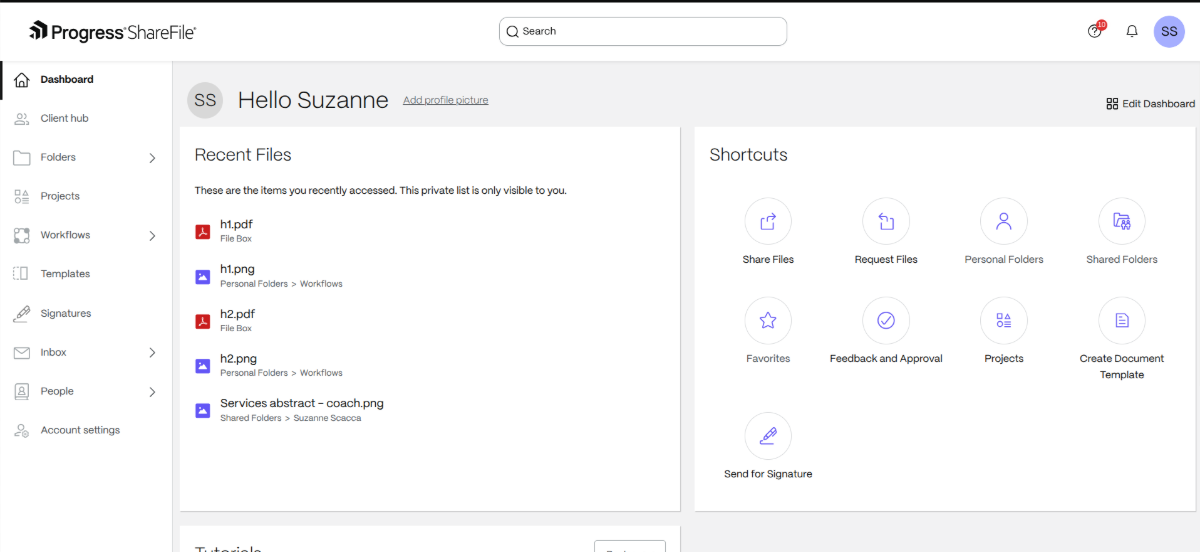
This EFSS comes with the following capabilities:
- Create personal and shared folder systems.
- Add hubs for each client where you assign contacts, share files and connect projects.
- Set up projects with associated to-dos lists, requests, files and comments.
- Use prebuilt templates (or create your own) to streamline task list and workflow setup.
- Send form-related requests (e.g., review/approval, signatures, etc.) to clients.
- Enable automated workflows to help keep file-related processes on track through completion.
- Give clients a place to submit visual feedback and approvals on files.
- Collect signatures from all necessary parties.
- Send automated reminders to help you get the files, approvals and signatures you need.
Without a tool like the ShareFile platform, firms often rely on a variety of software to support similar workflows. For example, you might use Dropbox for file sharing, Monday.com for project management, Honeybook for sending contracts and getting approvals, HubSpot for managing client information, and so on.
Modern workflows can’t be so inefficient or disparate anymore. That’s why solutions like the ShareFile platform are taking the lead.
2. Plans Made for Professional Services
If you need more features and storage, legacy EFSS solutions offer options to scale your plan. For example, Dropbox has four plans available.
- Plus is for single users.
- Professional is for solopreneurs with clients.
- Standard is for teams.
- Advanced is for companies.
Each plan adds more storage, file size transferability and restoration timelines. New capabilities become available as well, like PDF editing, signature collection and password protecting.
These are great features to add to an EFSS. The only problem is that they’re still pretty generic. Those in professional services—like accounting firms and consultancies—would benefit from more tailor-made functionality.
Let’s look at how the ShareFile solution differs in this regard:
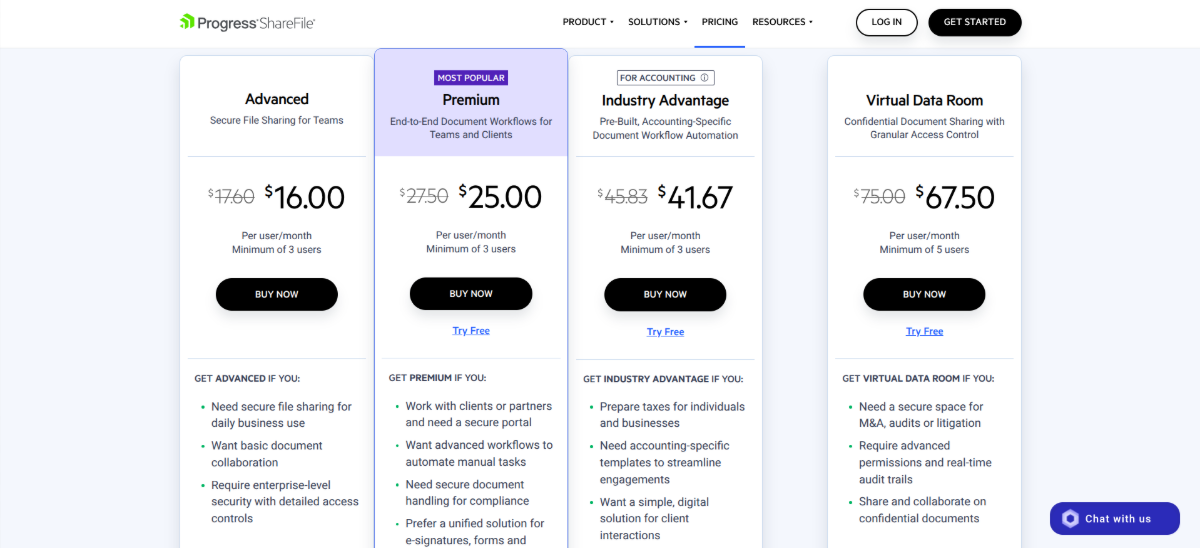
There are four plans available with industry-specific features included. For example:
- Document merge/packaging
- File check-in/check-out
- Integrated client onboarding processes
- Accounting-specific templates
- Tax preparation
- Automated e-signature letters
While individuals and solopreneurs can use ShareFile plans to scale up, they’re also designed with the needs of professional services firms in mind. If you’re looking for a way to scale your operations, you need a platform that will centralize as much of your document-related capabilities as possible.
3. Integration with Professional Services Software
Enterprises can’t afford to lose time on inefficient processes. One of the biggest time-sucks when it comes to file sharing and syncing comes from a lack of integrations.
Not only does the manual transfer of data from one platform to another waste time, so too does human error. Even the most diligent of employees can mess up when transferring data between tools.
This is why smooth integration between your EFSS and other software is a must.
Again, the problem with legacy EFSS systems is that they tend to integrate with other general-purpose software. Dropbox, for instance, integrates with HubSpot, Microsoft, Google Workspace, Adobe, AWS, Autodesk and Canva.
But what are the chances your organization uses only these apps?
If you’re using software to perform niche tasks related to accounting, for instance, those integrations won’t begin to cover your needs.
With ShareFile software, professional services firms get access to general-purpose integrations as well as those tailored to their unique business use cases. For example, ShareFile software integrates with:
| Integration | Purpose |
|---|---|
| Box | General file storage |
| Dropbox | General file storage |
| Google Workspace | Email, file creation and storage |
| Microsoft 365 | Email, file creation and storage |
| FreshBooks | Accounting |
| QuickBooks | Accounting |
| Xero | Accounting |
| Stripe | Payment processing |
| Applied Systems | e-Signatures |
| ProntoForms | Remote data collection |
| Sony Digital Paper | Document retrieval and sending |
| Pipedrive | CRM |
| Salesforce | CRM + document generation (e.g., contracts, agreements, quotes) |
| RedTail | CRM for finance |
| Orion | Financial advisor tech suite |
| Hubdoc | Financial document organization |
| ShareFile for Script Sfax | Healthcare faxes |
| Smartbid | Construction document management |
| BidPlanroom | Construction bidding management |
| TrialPad | Trial presentation documents |
And if you still can’t find your app on the list, Zapier works seamlessly with ShareFile software so you can set up custom connections to more than 4,000 apps.
4. Industry-specific Security Features
Legacy EFSS typically offer baseline security capabilities. Some Dropbox plans, for instance, come with:
- Two-factor authentication
- File sharing permissions
- End-to-end encryption
- Encryption keys
- Password protection
- Watermarking
- User tracking and history
- File recovery
Some vendors reference alignment with regulations such as GDPR and HIPAA, though implementation details may vary.
By contrast, EFSS built specifically for professional services firms have security features made for their unique use cases.
Let’s take the ShareFile platform, for example. In addition to the security features mentioned for Dropbox, ShareFile software includes additional security-focused capabilities, such as:
- Strict password policies
- Password hashing
- Account lockdowns
- Multi-factor authentication
- Remote locking and wiping of encrypted data when devices are lost or stolen
- TLS security protocols and 256-bit encryption for uploads and downloads
- Encrypted file links and messages
- Granular user access related to downloading, editing, copying and distribution
- Security alerts
- Terms and conditions acceptance on the login page
- Native e-signature technology
- AI-powered share setting recommendations to help reduce the risk of human error
- Watermarking, NDA enforcement and deal room readiness
- Virtual Data Room to protect sensitive documents and confidential transactions
- Audit trails
What’s more, ShareFile software supports compliance with GDPR, SEC, FINRA, HIPAA and more. The ShareFile datacenters have security certifications aligned with SOC 2 type 2, ISO 27001 and ISO 27701 frameworks.
When file security and compliance are necessary parts of business, many firms reconsider relying solely on legacy EFSS. And putting the onus on employees, clients and partners to work from secured devices and networks isn’t going to be enough. You need a file management system built to support strong security, privacy and compliance requirements.
Learn more about ShareFile security and compliance here.
Wrapping Up
Generic consumer and even enterprise file-sharing tools may do the trick for some businesses. However, professional services firms that share and manage highly sensitive data need something more.
With ShareFile software, your company gets access to features tailor-made for your enterprise, plans that scale alongside you, industry-specific integrations and robust security capabilities. If you’re looking for a way to enhance your file-related productivity, security and accuracy, this type of EFSS is a must-have.
Topics
-
Client Engagement
-
VDR
-
File Management
-
File Sharing
-
Integrated E-signature
-
Apps and Integrations
-
Workflow Automation
-
Security and Compliance
Subscribe to ShareFeed Today
Stay ahead with the latest ShareFile releases, feature enhancements, and product updates delivered monthly straight to your inbox.

A former project manager and web design agency manager, Suzanne Scacca now writes about the changing landscape of design, development and software.