Document Approval Workflow: A Practical Guide to Review, Routing, Revisions and Sign-Off

Share the article
ShareFile for Your Firm
Secure document workflows your team and clients will actually use
Get StartedKey Takeaways
A document approval workflow defines how to move the right version of a file through the right people, with a clear record of the decisions made along the way.
Document approval is easy when there’s one document and one decisionmaker. Add multiple reviewers, revisions, deadlines and signatures, and keeping track of who has approved what, and which version they approved, becomes much harder.
A document approval workflow defines how that process should work: who reviews and approves a document, the order in which they need to act, and how changes, reapprovals and final sign-off are handled. It keeps the right version moving through the right people, with a clear record of the decisions made along the way.
The process can be simple or involve several stages and approval routes. What matters is that everyone knows what needs to happen next.
Document Review vs. Approval vs. Signature
Review, approval and signature are different stages of a document workflow, even though they are sometimes treated as interchangeable.
| Stage | What it means | Typical action |
|---|---|---|
| Review | Check document for accuracy, completeness or required changes. | Comment, suggest edits or request revisions. |
| Approval | Decide whether the document is ready to move forward. | Approve, reject or return for changes. |
| Signature | Formally execute or acknowledge the finalized document. | Apply a physical or electronic signature. |
The same person doesn’t necessarily handle each stage. A subject matter expert might review a policy, a department leader approve it and an authorized signer complete the final signature.
What Does a Document Approval Workflow Look Like?
A typical document approval workflow moves through a series of stages:
Create → Review → Revise → Approve → Sign, if required → Finalize and retain
The route isn’t always straight through. Changes may send a document back for another review, an approver may reject it or an exception may change what happens next.
If a signature is required, it should be part of the same process rather than a separate handoff. Progress ShareFile integrated e-signature helps keep signing connected to the document workflow, including support for multiple signers, signing orders and signature-status tracking.
Sequential, Parallel and Conditional Document Approval
How a document moves between reviewers and approvers generally follows one of three patterns.
Sequential Approval
Approvers act in a set order:
Document owner → Department manager → Legal → Finance → Final approval
This works well when one decision depends on another, although a delay at one stage can hold up everything that follows.
Parallel Approval
Multiple people or teams act at the same time:
Document owner → Legal + Finance + Security → Final approval
This can speed up the process when each participant can make their decision independently. The workflow should also define what happens if one person requests a change after others have already approved the document.
Conditional Approval
A conditional workflow changes the approval route based on predefined criteria.
For example, a routine agreement might only need a department manager’s approval, while a higher-value agreement or one with changes to standard terms could also require finance, legal or executive approval. Other conditions might include document type, department, risk level, client requirements or regulatory requirements.
This adds oversight where it’s needed without sending every document through the same lengthy approval process.
Manage Revisions, Reapproval and Version Control
Not every change to an approved document means starting again. Fixing a typo is very different from changing a contract value, liability clause or policy requirement.
The workflow should define what counts as a material change, which changes require reapproval and whether the revised document needs to return to all or only affected approvers.
Version control is equally important. Otherwise, it’s easy to end up with:
Contract_Final.docx
Contract_Final_v2.docx
Contract_Final_v2_JL_edits.docx
Contract_FINAL_APPROVED.docx
At that point, the filename is doing work the process should be doing.
A document workflow should make it clear which version is current, what has changed, which version was approved and which was ultimately signed or finalized. That helps prevent an outdated or unapproved copy from making its way to final sign-off.
Define Who Is Responsible for Each Stage
Clear ownership helps prevent documents from stalling because nobody knows who needs to act next.
| Role | Responsibility |
|---|---|
| Document owner | Manages the document and keeps it moving through the workflow. |
| Reviewer | Checks the document and provides feedback or requests changes. |
| Approver | Decides whether the document can move forward. |
| Signer | Signs the finalized document where required. |
| Workflow administrator | Manages workflow rules, access and routing. |
The same person may take on more than one role, but their responsibility at each stage should be clear.
Set Deadlines and Plan for Exceptions
Even a well-defined approval process can stall when someone doesn’t act, or something doesn’t go to plan.
The workflow should account for:
- Due dates for reviews and approvals
- Reminders and escalation for overdue actions
- Delegation or reassignment when someone is unavailable
- Rejected documents or requested changes
- Conflicting reviewer feedback
- Declined signatures
- When an earlier stage needs to be repeated
ShareFile custom workflow automation can help automate repeatable processes with workflow tracking, reminders and reusable templates.
Bring External Reviewers into the Workflow
Clients, suppliers, partners and other third parties may also need to review, approve or sign documents. The challenge is giving them access to what they need while helping limit access to other files or information.
A secure client portal can help provide a central place for external participants to upload files, complete tasks, review documents and sign agreements, reducing reliance on email attachments.
The same rules still apply clear responsibilities, appropriate access and control over which version is being reviewed or signed.
Maintain Evidence of the Approval Process
The final document doesn’t always tell you how it got there. Depending on the document and your organization’s requirements, you may also need a record of:
- Who reviewed, approved or rejected it, and when
- Which version was involved
- What revisions were made
- Which version was ultimately signed or finalized
For signed documents, ShareFile integrated e-signature provides signing logs that can include timestamps, IP addresses, email verification and signature methods, with completed documents retained alongside their signing records.
Building that evidence into the workflow is easier than trying to piece it together later from emails and downloaded files.
How to Design a Document Approval Workflow
Before automating a workflow, establish who owns the document, who needs to review and approve it and how it should move between them. Then define the rules around revisions, deadlines, exceptions, external participants, signatures and the final record.
Once the process is working, reusable workflow templates can help teams apply the same rules to recurring document approvals rather than rebuilding them each time.
Document Approval Workflow Checklist
Before putting your workflow into practice, check that you’ve covered the essentials:
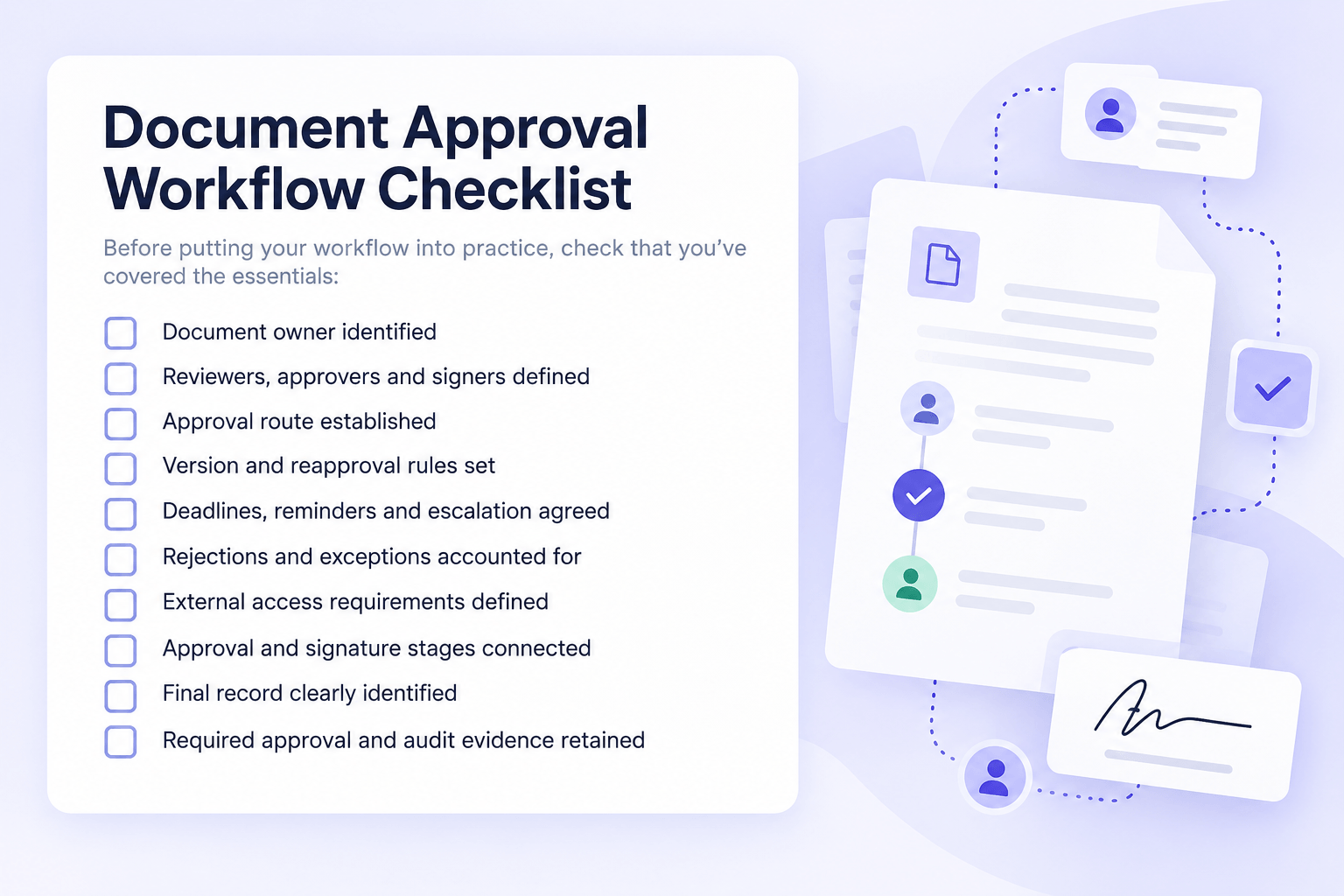
Document Approval Workflow Examples
Contract Approval
A sales agreement might move from the business owner to legal and finance before going for signature. Standard contracts could follow a shorter route, while higher-value agreements or changes to standard terms trigger additional approval.
Internal Policy Approval
A policy might go to subject matter experts for review before compliance, legal or senior leadership approves it. Reviews could happen in parallel, with significant later changes triggering reapproval before publication.
Client Document Approval
A professional services firm might complete its internal review before sending a document to the client for approval or signature, with controlled access to the document and its final approved version.
What to Look for in Document Approval Workflow Software
Once the process is defined, technology can reduce the manual work needed to keep it moving.
Look for document workflow software that can support:
- Controlled versions and features that support more secure document access
- Internal and external collaboration
- Automated routing, reminders and status tracking
- Connected review, approval and electronic signatures
- Final records and relevant audit information
- Features that help organizations address relevant regulatory requirements
How those capabilities work together matters too.
Keep Document Review, Approval and Signatures Connected
A good document approval workflow should make three things clear at any point:
- Where is the document?
- Who needs to act?
- Which version is authoritative?
The goal is to reduce the manual handoffs between review, approval and signature rather than simply automate each step in isolation.
ShareFile software brings capabilities for more secure document sharing, collaboration, custom workflow automation, client portals and integrated e-signature together to help keep documents connected from review and approval through final sign-off.
Get started with ShareFile to keep document review, approval and signatures connected in one governed workspace.
Document Approval Workflow FAQs
What Is a Document Approval Workflow?
A document approval workflow defines how a document moves through review, revisions, approval and, where required, signature.
What Is the Difference Between Document Review and Approval?
Review involves checking a document and providing feedback. Approval is the decision that allows it to move forward.
What Are the Main Types of Document Approval Workflow?
The three common patterns are sequential, parallel and conditional approval.
When Does a Revised Document Need to Be Approved Again?
Reapproval is typically needed when a material change affects something covered by an earlier approval. Organizations should define which changes trigger it.
How Can You Improve a Document Approval Workflow?
Define clear ownership, approval routes, version rules, deadlines and exception handling, and remove unnecessary approval stages.
Why Is Version Control Important During Document Approval?
It helps establish which version was reviewed, approved and ultimately signed or finalized.
What Should Be Included in a Document Approval Audit Trail?
Depending on requirements, this can include document versions, reviewer and approver activity, dates, decisions, revisions and signature activity.
Topics
-
Client Engagement
-
VDR
-
File Management
-
File Sharing
-
Integrated E-signature
-
Apps and Integrations
-
Workflow Automation
-
Security and Compliance
Subscribe to ShareFeed Today
Stay ahead with the latest ShareFile releases, feature enhancements, and product updates delivered monthly straight to your inbox.

Katie Austin is a media strategist and audience engagement expert with a passion for data-driven storytelling. As the Strategic Awareness & Advocacy Lead for Progress Sitefinity, she brings years of experience in audience development, media analytics and social strategy from top mainstream media organizations.
Related Posts