Ways to Improve Your Workday and Workload with Proactivity
“I wish we’d done this sooner.” If you’ve ever had this thought at work, it could be because your approach is more reactive than proactive. In this post, you’ll find some tips for using proactivity to your advantage as a web designer.

A reactive approach to work is one in which you respond to situations or problems as they arise. A proactive approach, on the other hand, is one in which you anticipate a scenario and then solve (or mitigate) it before it happens.
Taking a reactive approach to web design and development is challenging. You probably already have a full workload. When you work reactively, you allow outside forces to control how you work, what you work on and when it gets done. This can lead to tons of disruption and stress.
With proactivity, you take the reins. You might not be able to control everything that happens. However, there is a lot that you can anticipate. By looking ahead, you can prepare for it and then make it work for you and your schedule and workflow.
4 Ways to Be More Proactive as a Web Designer
Shep Hyken wrote a short summary of his top customer experience predictions for 2026. In the post, he said that customers will continue to have sky-high expectations for the brands they engage with. One of those expectations involves proactivity.
“Proactive service is your new competitive advantage. One way to describe proactive service is ‘no service.’ The customer doesn’t need to reach out because you addressed the issue before they even knew about it or had to contact you.”
This specific example shows how being proactive can benefit your clientele. But it can also benefit your team and entire organization.
By thinking ahead and preparing for it, you can create a better experience for all involved. Here are some tips for using proactivity to streamline your internal workflows and client-facing interactions.
1. Discuss Goals Early On
When discussing a possible project with a prospective client, the conversation usually revolves around answering the following question:
“What do you need?”
And because the client is likely feeling a sense of urgency, their mind will go to:
“What do you need right now?”
It’s an important question to answer. And the more clarity you get from them on what they want you to build, the better. (As we’ll see in the next point.)
However, it’s also valuable to know the answer to this question:
“What is your end goal?”
In other words, what should this website or app accomplish for them?
Do they just need to establish an online footprint? Do they need to generate a certain amount of leads or customers each month? Are they going after a local audience or one on a much larger scale?
These kinds of questions will help you better determine what you’re going to do for them.
For instance, if they want to build brand visibility, then adding an SEO strategy is a must. If they’re looking to convert leads, then UX research, user persona development and journey mapping would be helpful. And if they’re targeting a local audience, you may need to implement things like a language switcher or locale-specific payment gateway.
Another question to explore with prospective clients is:
“What is next for you once the website/app is done?”
This goes beyond what they want the new website or app to accomplish. This gets them to look months down the line at what else is important to them.
You might discover that they are interested in:
- Website maintenance and support
- Social media marketing assistance
- A mobile app to go with their website
- Blog growth and development
- A/B testing and optimization
Imagine building out a website for a local restaurateur. It has all these essentials for getting the new establishment off the ground. However, the owner waits until after the site launch to ask about what they should do about the site as they open new locations around town. This information would’ve been really valuable as you planned out the infrastructure of the site and even the SEO strategy.
By forcing your clients to be proactive themselves, it can help you put together the most effective proposal and plan for them straight out the gate.
2. Establish a Clear Scope of Work
When proposing the scope of work (SOW) to a prospective client, be as specific as possible. If the terms are too vague or the scope too basic, many issues can arise as a result.
You don’t need to anticipate how exactly each client will challenge or misunderstand the basic scope of work you proposed. Whether they misunderstood the terms and have to ask you to rework a major part of the prototype, or they insist on you doing more than what was originally discussed, it’s going to cost you and your team down the line.
Here’s what a problematic SOW might look like for a website development project:
Build a website with 35 pages and a blog for a financial services company.
This is a straightforward summary of what you’d be doing. It even mentions how many pages you’ll build and that a blog will be included. But it leaves too much open for interpretation. If you think ahead, you can see how you might run into issues with some clients if this is all they’re given.
Instead, your SOW should be as detailed as possible. Here is an example of the kind of information to include:
| Summary | Build a website with 35 pages and a blog for a local financial services company. |
| Scheduled Start Date | March 26 |
| Proposed Delivery Date | June 1 |
| Tools |
|
| Pages |
|
| Special Features |
|
| Other Notes | Content to be personalized on homepage based on:
|
Your SOW and project proposal can include much more information than this. This is just to give you an idea of how you can use this to prevent clients from misunderstanding the plan or trying to push the boundaries of your agreement.
By breaking it all down up front, reviewing it with them and getting them to sign and agree to the terms, you limit the possibility of surprises. And if they do want to change things, your carefully explained change request policy will dictate what extra costs they will incur and how this affects the rest of the timeline for the project.
3. Pitch Your Services When Clients Are Ripe for a Change
You could always wait for new clients to come knocking at your door. But the web design and development field is inundated with companies and freelancers. Not only that, you also have to contend with AI as a competitor now.
Rather than sit and wait, you can be proactive about drumming up new business. And to make these client-chasing efforts worth your while, you should be pitching to clients with the greatest likelihood of saying “yes.”
Here’s how you do that:
What do you look for when seeking out new clients or opportunities? Is it surface-level information, like making sure their business operates in one of your niches? Or do you dig deeper to see if they’re primed for your pitch?
For example, let’s say you build websites for colleges and other educational institutions. There’s a large university nearby that you’d love to work with, so you decide to pitch them a redesign of their website and student portal.
Before you do, consider the following:
Do they have an in-house designer or go-to agency that handles their design and marketing?
Look at the footer to see if an external agency has inserted their info down there. You can also do a search for the school’s name and “redesign” to see if an agency wrote up a case study about them. If they already have someone and you don’t see any major issues with what they currently have, there’s no point in pitching them right now.When was the last time their website or portal was redesigned?
The Wayback Machine will help you find that answer. If it’s been less than two years, you might want to put a pin in this and circle back once their site starts to look dated or has other noticeable issues.How is the organization doing money-wise?
Some online research will let you know about their financial standing. If the school isn’t doing well with funding, they might not be super eager to spend money on a website overhaul (unless you can prove that it’ll increase enrollment and fundraising).
This is what I mean by pitching your services when a prospect is ripe for a change. Sure, you could send out generic pitches to tons of educational institutions in the hopes that someone bites. But it would be much more effective if you were to research the field and narrow down your best options. By doing your research, you’ll see if they’re in a good position to say “yes” instead of “maybe later” or “no.”
In addition to the questions above, here are some other things to look for when determining the viability of a lead:
- Major shake-ups in their industry and how well their organization is keeping pace
- New competitors that are stealing business from them and why
- What people are saying about the company on social media
- Google news about upcoming updates or penalties that could affect their digital presence
In addition to researching your market, I’d suggest having a plan for reconnecting with former clients.
For starters, use your CRM to see how long it’s been since they’ve had their websites or apps redesigned. You can also look at how well or poorly their SEO and marketing efforts are going. You could even use something like Google PageSpeed Insights to analyze their Core Web Vitals to see if you can get in the door by pitching them a technical audit and tune-up.
4. Streamline Your Workflow with Templates
Even if the digital products you design look wildly different from one another, I bet the workflows have a ton of overlap. If you can anticipate that you’ll be performing similar tasks, sending similar emails and hitting similar milestones, you can save time by planning them out in advance.
For starters, have a look at your project setups from the last year or so. If you’re not already using templates to set up new project folders and task lists, you can start doing so now.
If you’re able to anticipate what lies ahead, you can templatize much of what you do, including:
- Contract generation
- Signature collections
- Project management setup
- Milestone reminders
- Client follow-ups
Progress ShareFile is one such tool that can be helpful in this regard. When setting up a new project, you can either start with a blank folder or launch a template.
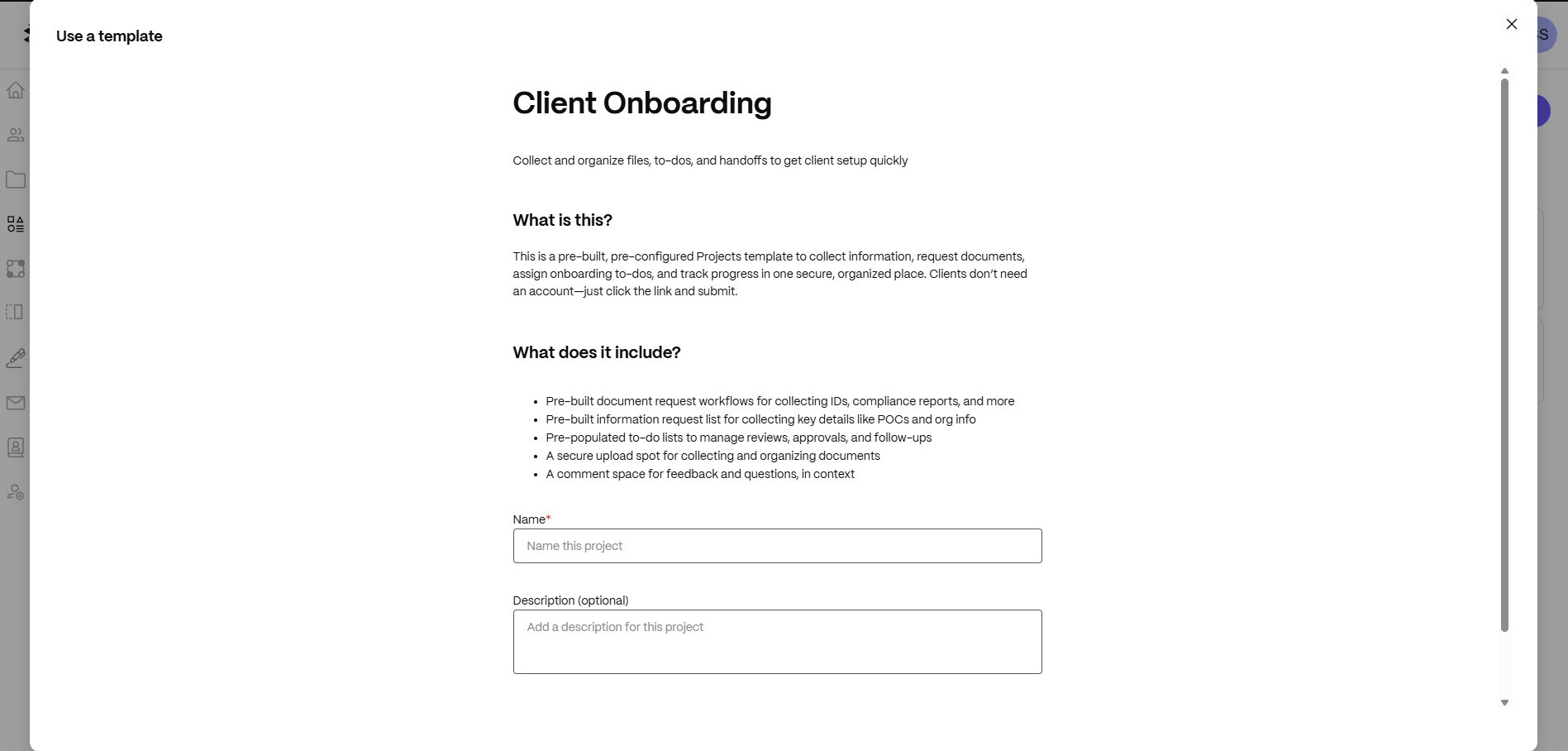
This one is a template called Client Onboarding. There’s also one in there for Project Kick Offs, which might be useful in your work.
The great thing about these templates is that they give you a solid baseline to start from and allow you to customize them to create your own. If you know what kinds of tasks you’ll do, documents you’ll need, and workflows you’ll follow, there’s no reason not to start with a template. Build it all out once and then make tweaks whenever you launch a new project.
You can use ShareFile to automate other parts of your process, too. I wrote about a number of them in this post: Tips for Working More Smoothly with Clients and Team Members.
Another way you can plan ahead is by templatizing your most common communications. By saving copies of these messages in the cloud, you and your team can more swiftly respond to clients and keep projects moving along smoothly.
Here are some emails you might want to templatize:
- Prospecting letters
- Getting started summaries
- Project kickoff requests
- Milestone completion notices
- Follow-ups/reminders
If you don’t have any generated yet, here are some email templates to get you started.
As with any other templates you use, you should review and customize them before sending to clients. Even if most of the details are relevant from job to job, there could be something in there that’s different and needs to be edited or removed so as not to cause confusion.
When plotting out your project task list, add these email/messaging templates to it. This will streamline your workflow even further.
Wrapping Up
Think back to your last couple months of work. What percentage of the time would you say you were working reactively? If you’re frequently having thoughts like:
- “I should’ve thought of that before.”
- “I wish we’d done this sooner.”
- “I had a feeling that was going to happen.”
… Then you’re probably taking a more reactive approach than a proactive one.
To save yourself time and prevent disruption and stress, take some time to think about the past year or so of work. Are there certain scenarios or problems that keep arising? If so, come up with a plan for prevention.
You might not be able to avoid unexpected website or app downtime, but you can mitigate for plenty of non-emergency situations with proactive measures like goals discussions, detailed SOWs, streamlined workflows and more.
Read next: Tips for Working More Smoothly with Clients and Team Members

Suzanne Scacca
A former project manager and web design agency manager, Suzanne Scacca now writes about the changing landscape of design, development and software.
Related Resources